Advanced Integration Reporting
Automate Financial Reporting through Custom Financial Workflows and Trainings! See details below
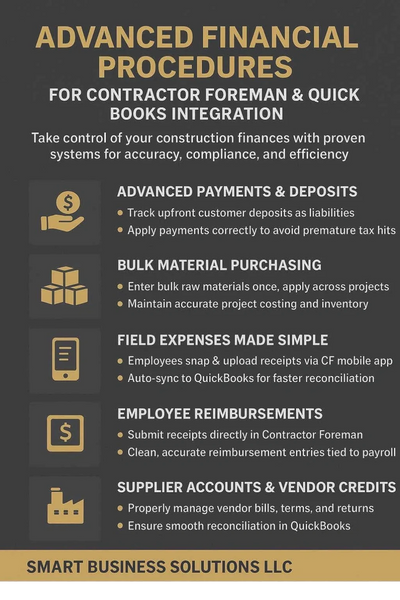
We have developed a comprehensive set of tailored financial procedures designed to automate and enhance your reporting in QuickBooks Online (QBO) based on Contractor Foreman transactions. Our solutions cover a wide range of critical tasks, including proper registration of advanced deposits for accurate revenue recognition, tracking bulk purchases for inventory management, and much more. Empower your team with efficient, reliable, and accurate financial workflows that save time and reduce errors. Partner with us to transform your financial operations and gain greater control over your business finances!
Contact Us
We would love to hear from you! Contact us today to discuss your construction management needs and learn more about how we can help you achieve your goals.
Trainings, Financial Procedures, automated Reports
Purchase Financial Procedures and Trainings $1700.50

This cost includes the setup the 5 financial procedure and 3 initial workflow trainings, plus the option of mapping your cost codes or 5 additional trainings. You will be asked to fill out a short questionnaire and then you will be sent the Estimate based on the optional choices available.
Schedule a 45 Meeting

Schedule a one time 45 min Intro meeting to discuss your companies needs
Cost Codes Mapping Only $500.00
Custom Cost Codes Template Creation $275
Custom Cost Codes Template Creation $275
Let us help you map your Current Cost Codes to your QuickBooks account for proper job costing
Custom Cost Codes Template Creation $275
Custom Cost Codes Template Creation $275
Custom Cost Codes Template Creation $275
Let us help you create the Cost Codes for your companies needs.
New Advanced Financial Procedures For QuickBooks
Deposits/Advanced Payments Procedure
Deposits/Advanced Payments Procedure
Deposits/Advanced Payments Procedure

Overview Summary
The document describes a detailed procedure for managing advanced payments (customer deposits or draws) within construction projects using QuickBooks and Contractor Foreman (CF). The primary objective is to avoid recognizing upfront payments as immediate income, which can lead to premature tax liabilities. By treating advance payments as a liability initially and systematically applying them to invoices as the project progresses, contractors can accurately reflect income and expenses, ensuring compliance and sound financial management.
Bulk Materials Purchases Procedure
Deposits/Advanced Payments Procedure
Deposits/Advanced Payments Procedure
Overview Summary
This procedure details the process of purchasing bulk raw materials and applying them to specific projects within Contractor Foreman (CF) and QuickBooks Online (QBO). It involves setting up generic projects and specific accounts to track inventory and its usage. The main goal is to properly account for bulk material purchases, track their application to individual projects, and maintain accurate financial records.
Employee Reimbursements
Deposits/Advanced Payments Procedure
Overview
While allowing your employees to enter their reimbursable expense receipts into Contractor Foreman through their (CF) app to accurately track project and non-project related costs; it is also simultaneously recording reimbursable employee expenses in QuickBooks to apply to payroll later. Moreover, maintaining clean and accurate financial records in both Contractor Foreman and QuickBooks Online.
Field Expenses Procedure
Net Term Supplier Account Procedure

Overview
This workflow safely delegates the responsibility of entering project-related expenses into Contractor Foreman to those making the purchases in the field while safeguarding QuickBooks integrity. By using the Contractor Foreman app already downloaded for time tracking, it is easy to apply an additional step of also using the app to capture receipts into Contractor Foreman. This process will cause both the expense and the receipt image to transfer to QuickBooks and match the bank transactions; saving the accounting team hours tracking down receipts and ensuring project related expenses apply to projects accurately and promptly.
Net Term Supplier Account Procedure
Net Term Supplier Account Procedure
Net Term Supplier Account Procedure
Overview
Establish a reliable and systematic approach for handling supplier accounts that operate with net terms. This ensures that all vendor transactions are accurately tracked through Contractor Foreman and allocated to the correct projects or back stock, from payment initiation to the allocation of vendor credits and the reconciliation of paid bills. Reviewing and reconciling balances between CF and QBO helps ensure that transactions are accurately matched to the appropriate customer or project, reducing the likelihood of errors or misallocation.